
Speedify IP Leak Protection Overview
This article explains what IP Leak Protection is in Speedify, why it matters, and when you might want to turn it off.
What Is IP Leak Protection?
When you use Speedify, your internet traffic is routed through Speedify's servers so that websites you visit see Speedify's IP address rather than your own. IP Leak Protection ensures that stays true, even for DNS requests that could otherwise bypass Speedify and expose your real IP address and location to the sites you visit.
We recommend keeping IP Leak Protection ON at all times for the best privacy protection.
When to Turn IP Leak Protection Off
If your device is having trouble communicating with other devices on your local network, or if certain apps are not working as expected, turning IP Leak Protection off may resolve the issue. With IP Leak Protection disabled, those apps can send their internet traffic around Speedify's VPN if they need to. If you see devices like Chromecast, cameras or printers not working as expected with your device, try switching off IP Leak Protection.
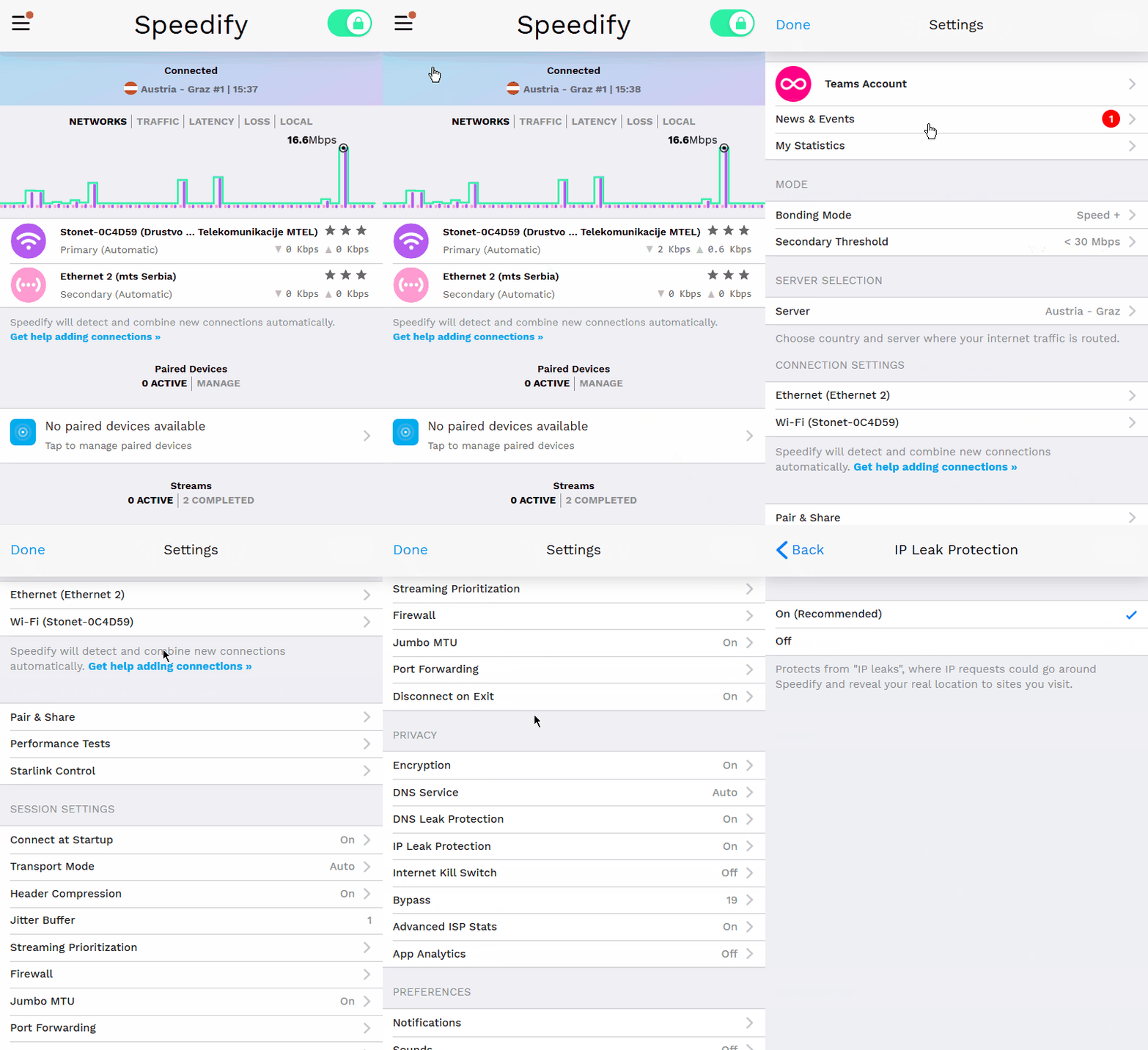
How to Toggle IP Leak Protection
The setting is located in the Privacy section of Speedify's settings. Toggle it on or off depending on your needs.
Did you know - Speedify's Pair & Share feature lets you share your internet connections with other Speedify users on the same local network. Learn more about Pair & Share.