
Accessing Restricted Websites when Using Speedify
Some websites and streaming services block access through VPN Servers. This article explains how to switch to a different server or use Speedify's Bypass feature to get access to the sites you need.
Why a Website Might Be Blocked When Using Speedify
When you connect through Speedify, your internet traffic passes through one of Speedify's servers before reaching its destination. Some websites detect and block the IP addresses associated with those servers, which can prevent you from loading the site or service.
In many cases, switching to a different server at the same location resolves the issue. If every server at that location is blocked, you can use Speedify's Bypass feature, which lets your internet traffic reach a specific site without going through a Speedify server at all.
Let's Get Started
Step 1: Open the Server Selection Menu
You can reach your Server selection menu in two ways:
- Click the ☰ menu in the upper-left corner of the Speedify dashboard, then choose Server.
- Click the Server name displayed in the center of the Speedify dashboard.
Either path opens the full server list, where you can browse all available locations and servers.
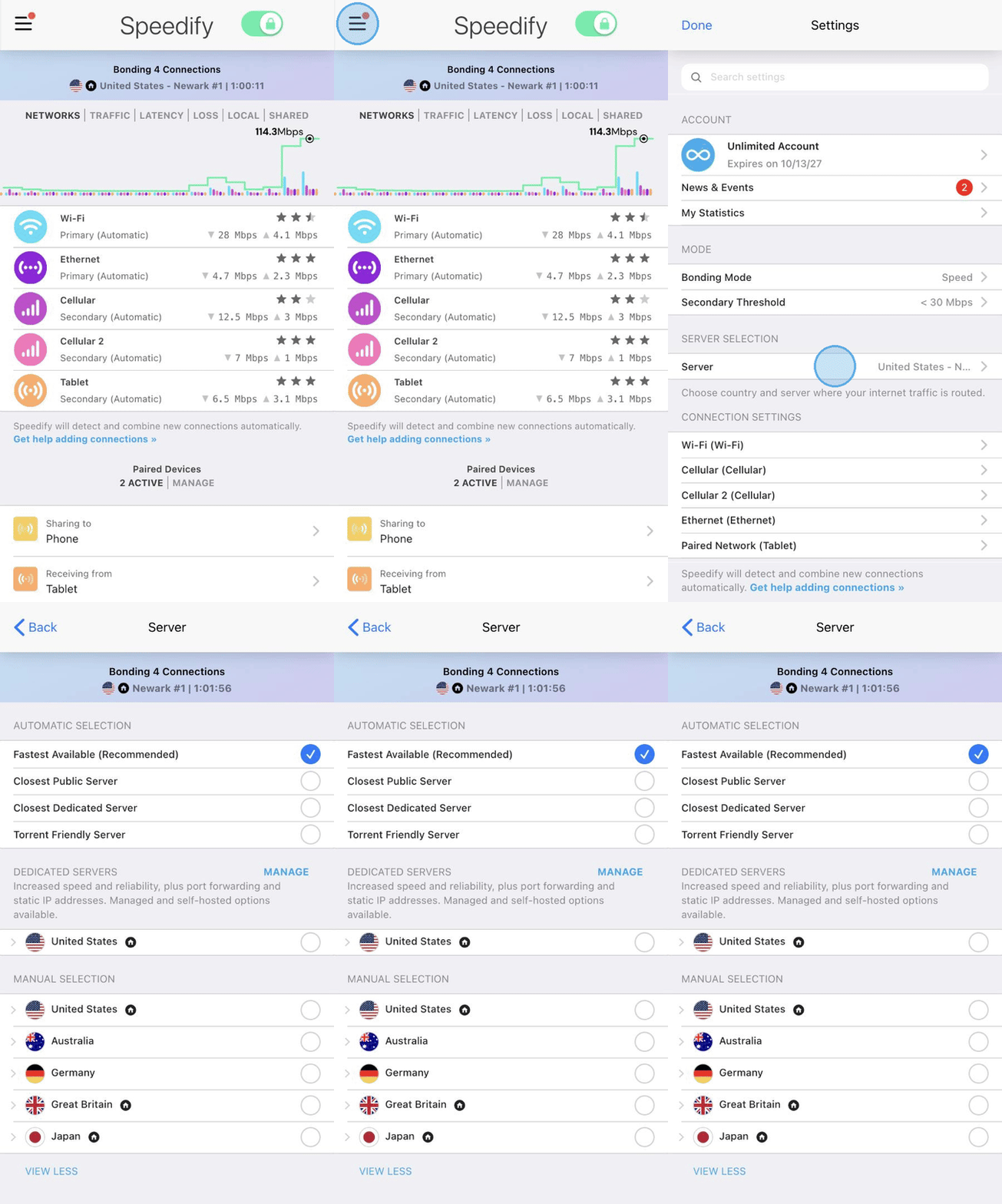
Step 2: Switch to a Different Server
Once the server list is open, find your current location and select a different server within the same region. Some locations have multiple servers to choose from. If the server you pick isn't available, Speedify connects to the most similar server and shows "Selected server not available, most similar server used", so check which server you're on before testing the site again. After switching, reload the website to see if access is restored.
Step 3: Try Speedify's Bypass (If Switching Servers Doesn't Help)
If all servers at a location are blocked by the site you're trying to reach, Bypass can help. When Bypass is enabled for a specific site, Speedify sends that site's internet traffic directly from your device rather than routing it through a Speedify server.
For details on how to set up and use Bypass, see Speedify Bypass Overview.
Did you know - Speedify works on routers too, so every device on your network can benefit from faster upload and download speeds without needing to install anything on each device individually. Learn more about Speedify for Routers.